Press Kit
Everything a journalist needs about PasteMyClip, on one page. Questions or a review license: [email protected].
The story
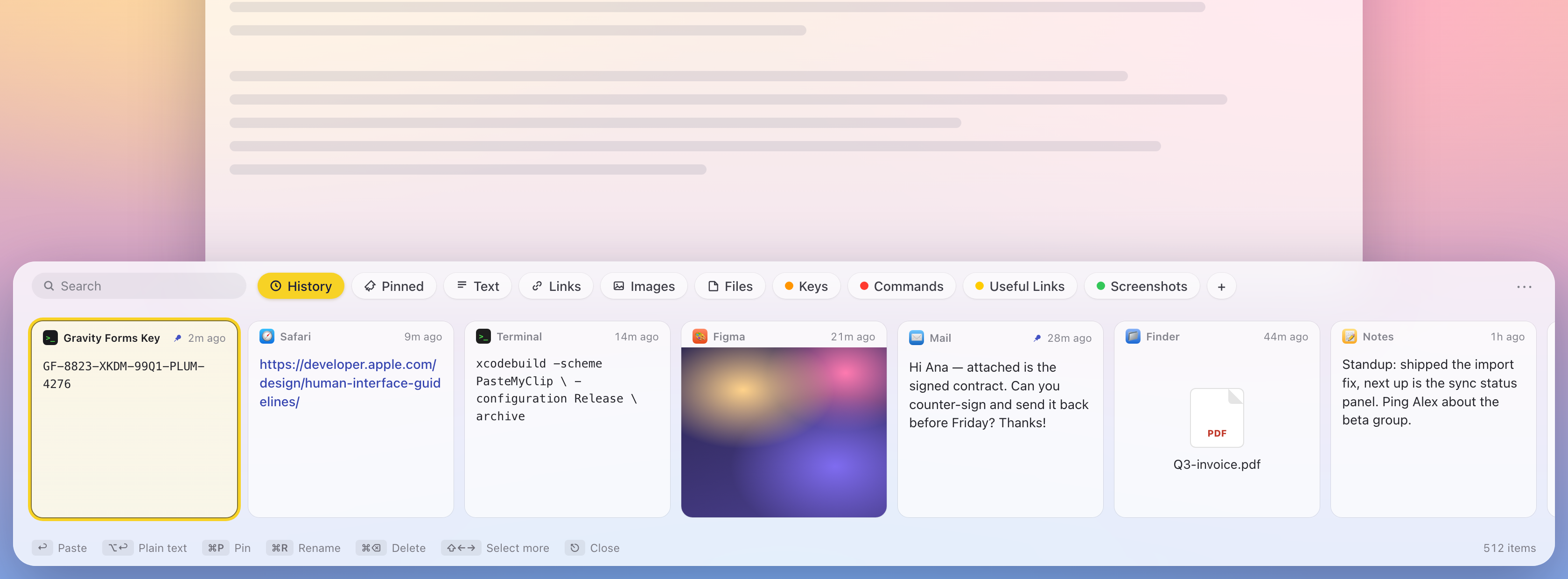
PasteMyClip is a clipboard manager for the Mac built by a solo developer, Raju Mandapati, around one idea: a small, essential utility shouldn't bill like a streaming service. It puts everything you copy in a Paste-style visual shelf at the bottom of the screen — cards you can search, pin, label, and paste back into the frontmost app with one keystroke — from $9.99, once, while the category's popular apps charge $29.99/year or gate history behind a $10/month plan. There is no PasteMyClip account and no PasteMyClip server: history lives on the user's Mac and, when sync is on, mirrors between their Macs through their own private iCloud via CloudKit. The app is sandboxed and notarized, imports an existing Paste library (history and pinboards) in one click, and runs on macOS 14 and later.
Fact sheet
- Name
- PasteMyClip (one word)
- Price
- $9.99 for 2 Macs or $14.99 for up to 5 Macs, one-time purchase (via Polar). Free updates. 14-day no-questions refund.
- Platform
- macOS 14 (Sonoma) and later; native Liquid Glass design on macOS 26
- Current version
- 0.13.0
- Distribution
- Direct download from pastemyclip.com; automatic updates via Sparkle. Sandboxed, notarized, native Swift/SwiftUI (no Electron).
- Developer
- Raju Mandapati (solo developer)
- Website
- pastemyclip.com
- Press contact
- [email protected]
Why it's different
-
Pay once, no asterisk
$9.99 buys the app for two Macs ($14.99 for five), updates included — against Paste at $29.99/year, Pastebot at $39 plus $19/year for updates, and Raycast's unlimited history behind a $10/month plan.
-
No-server privacy
Zero vendor servers, no account, no analytics. Clipboard history stays on-device and syncs between the user's Macs through their own private iCloud (CloudKit). Concealed clipboard content from password managers is never recorded.
-
One-click import from Paste
Reads an existing Paste library and brings over the full history; pinboards become labels. Switching costs nothing but the $9.99.
-
A real shelf, keyboard-first
⇧⌘V slides up a card shelf without stealing focus: pin, label, rename, and multi-select cards; paste as plain text; Enter pastes directly into the app you were using.
Assets
Free to use in coverage of PasteMyClip. Need a different size or format? Email us.

Product images
The shelf render below shows the real UI with demo clipboard content and is free to use in coverage. For raw screen captures or additional shots, email [email protected] — same-day turnaround.
About PasteMyClip
PasteMyClip is a pay-once ($9.99 for 2 Macs, $14.99 for 5) clipboard manager for macOS 14+ that puts clipboard history in a visual shelf and syncs it between a user's Macs through their own private iCloud — no subscription, no account, no vendor servers. It is built and maintained by solo developer Raju Mandapati.
Press contact: [email protected]. Review licenses are available on request — just email us.